> For the complete documentation index, see [llms.txt](https://gitbook-v2-go126epqd-gitbook.vercel.app/url/gitbook.com/docs/llms.txt). Markdown versions of documentation pages are available by appending `.md` to page URLs; this page is available as [Markdown](https://gitbook-v2-go126epqd-gitbook.vercel.app/url/gitbook.com/docs/analytics/insights/ai-insights.md).
# AI Assistant
See what your visitors ask GitBook Assistant, how well your content answers them, and where your docs fall short
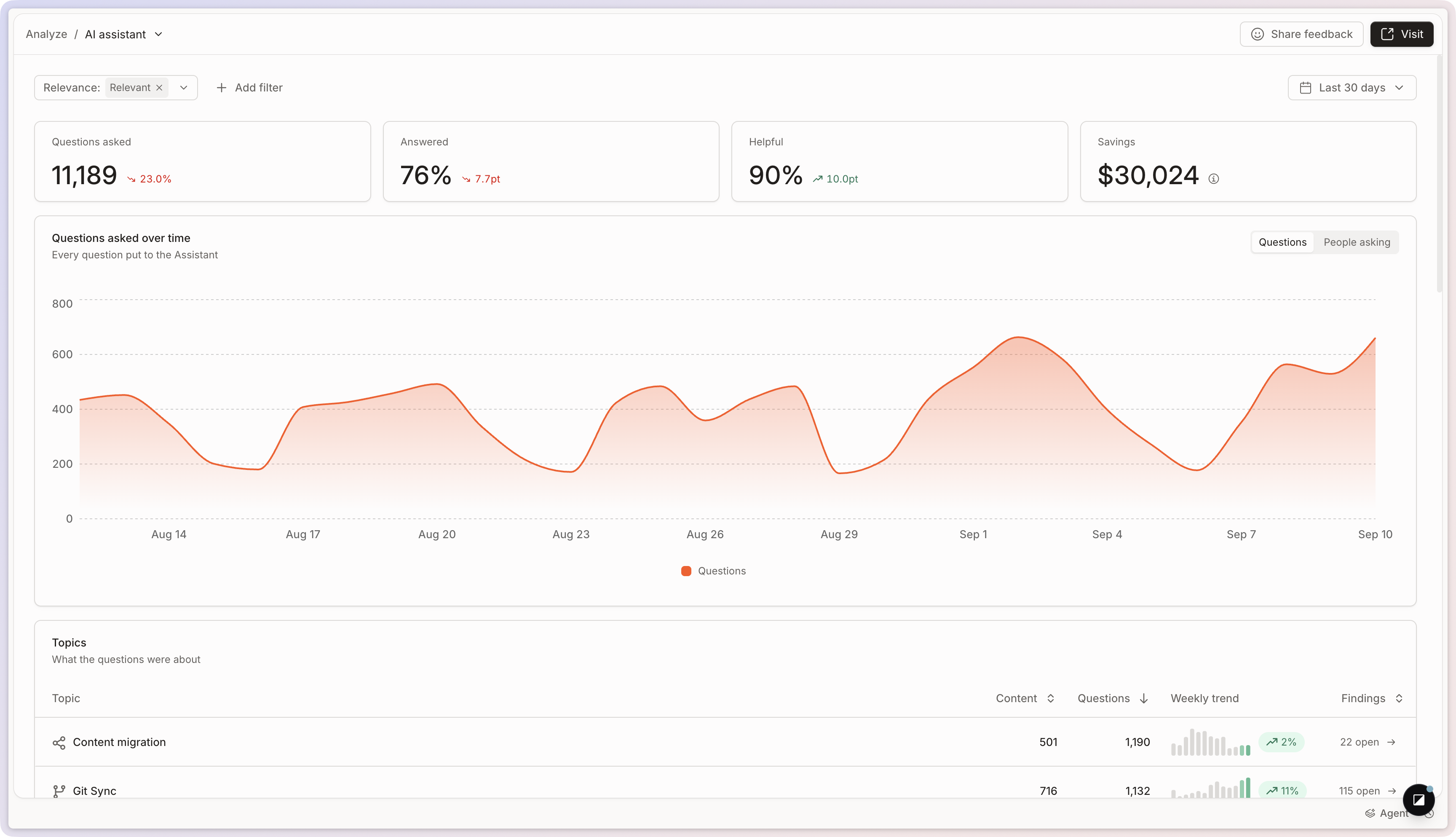
The **AI Assistant** report shows what your visitors ask and how effectively [GitBook Assistant](/url/gitbook.com/docs/ai-for-your-readers/gitbook-ai-assistant.md) answers them using your content.
To open it, go to **Analyze → AI Assistant** in your site’s sidebar.
Four metrics summarize the period you selected:
* **Questions asked**: the questions visitors put to the Assistant.
* **Answered**: the share of questions the Assistant resolved.
* **Helpful**: how visitors rated the answers they got.
* **Savings**: the estimated support effort avoided by answering those questions.
See [Site analytics](/url/gitbook.com/docs/analytics/insights.md) for filters, time periods, and comparing periods.
The AI Assistant report.
## Topics
GitBook groups questions into **topics**, so you can read what your visitors want at the level of a subject rather than one question at a time. Each topic shows how it performs over time and how much of your traffic it represents.
Click a topic to open its detail view and see every question in it, grouped by **Type** or **Recency**. Use this to review recurring needs, spot documentation gaps, and understand whether your site answers questions in that area successfully.
## Breakdowns
Three cards break the period down by **Answered** (whether the response solved the question), **Categories** (the type of question asked), and **Channels** (where the Assistant was used: your site, the [Docs Embed](/url/gitbook.com/docs/publish/embedding.md), or a connected tool). Click any value to filter the whole report by it.
## Questions
The **Questions** card lists every question put to the Assistant. Click one to see how GitBook handled it and which content supported the response.
At the top of the detail view, you can review the question itself, how often visitors asked it, its type, and the topics it belongs to.
### Conversations and answer quality
Below the summary, you can review the conversations tied to the question and see whether GitBook answered it fully, partially, or not at all. The conversation panel also shows the full Assistant exchange, including any follow-up questions and responses.
### Sources and context
The sources section shows which pages, records, or [connected content](/url/gitbook.com/docs/ai-for-your-readers/connections.md) GitBook used to answer the question. Use this to verify the AI drew from the right content — and to find places where relevant pages exist but weren’t surfaced.
### Export questions and answers
From the Questions card, click **Export as CSV** and choose what to download:
* **Questions summary**: one row per question, with its totals.
* **Answers detail**: one row per answer, with its topics, resolution, helpfulness, relevance, thumb feedback, channel, and language. Use it to see what the Assistant replied and whether the answer landed.
## FAQ
How do I use the AI Assistant report?
It gives your team an overview of how visitors interact with your documentation when searching for answers.
Filtering the report helps you identify content gaps. You can filter for the following:
* The questions visitors ask most often
* Questions visitors search for that don’t have answers
* Topics your documentation doesn’t cover
Addressing these gaps helps visitors find answers more quickly — and understand your product faster.
{% hint style="info" %}
[Content gaps](/url/gitbook.com/docs/analytics/content-gaps.md) collects these gaps into a ranked list, and GitBook Agent can open a change request to fill one.
{% endhint %}
How is “Savings” calculated?
It’s an estimate, based on the assumption that one in five answered questions would otherwise have become a support ticket. An organization admin can set the cost of a support ticket, or a support hour, through the API to make the estimate reflect your team. Treat it as an order of magnitude rather than an exact figure.
---
# Agent Instructions
This documentation is published with GitBook. GitBook is the documentation platform designed so that both humans and AI agents can read, navigate, and reason over technical content effectively. Learn more at gitbook.com.
## Querying This Documentation
If you need additional information that is not directly available in this page, you can query the documentation dynamically by asking a question.
Perform an HTTP GET request on the following URL with the `ask` and `goal` query parameters:
```
GET https://gitbook-v2-go126epqd-gitbook.vercel.app/url/gitbook.com/docs/analytics/insights/ai-insights.md?ask=&goal=
```
`ask` is the immediate question: it should be specific, self-contained, and written in natural language.
`goal` is what the user is ultimately trying to achieve, the reason they need the answer. Sharing it helps GitBook give you a better, more relevant answer. A goal is most helpful when it describes the outcome the user wants rather than restating the question. For example, with `ask=how do I create an API token`, a goal like `build a script that syncs our docs to a CMS` lets GitBook tailor the answer to that use case.
The response will contain a direct answer to the question and relevant excerpts and sources from the documentation.
Use this mechanism when the answer is not explicitly present in the current page, you need clarification or additional context, or you want to retrieve related documentation sections.